Objectives
In this session we will fit some non-spatial models to spatial data in order to demonstrate key ideas in statistical modelling that will be built on in future modelling sessions.
The session will cover:
- Revising how to fit linear models
- Fitting GLMs
- Some model diagnostics
A good text on learning the ins and outs of Generalised Linear Models is Dobson and Barnett (2008); for Generalised Additive models, Wood (2017); and for more general multilevel/hierarchical modelling, Gelman and Hill (2006).
Packages
# Load the packages needed for this practical
if (!require("pacman")) install.packages("pacman")
pkgs = c("sf",
         "scales",
         "mgcv",
         "tidyverse", "magrittr")
pacman::p_load(pkgs, character.only = T)
Refresher - linear models
Reading data in and visualising
Load the tidyverse package and read in the rats data. Ensure that the ID column is a factor
library(tidyverse)
rats_df <- read_csv("./data/rats/rats.csv",
col_types = list(ID = 'f'))rats_df## # A tibble: 150 × 3
## ID time weight
## <fct> <dbl> <dbl>
## 1 1 8 151
## 2 2 8 145
## 3 3 8 147
## 4 4 8 155
## 5 5 8 135
## 6 6 8 159
## 7 7 8 141
## 8 8 8 159
## 9 9 8 177
## 10 10 8 134
## # ℹ 140 more rowsggplot(data = rats_df,
aes(x = time, y = weight)) +
geom_line(aes(group = ID)) +
theme_minimal() +
xlab("Time (days)") +
ylab("Weight (grain?)")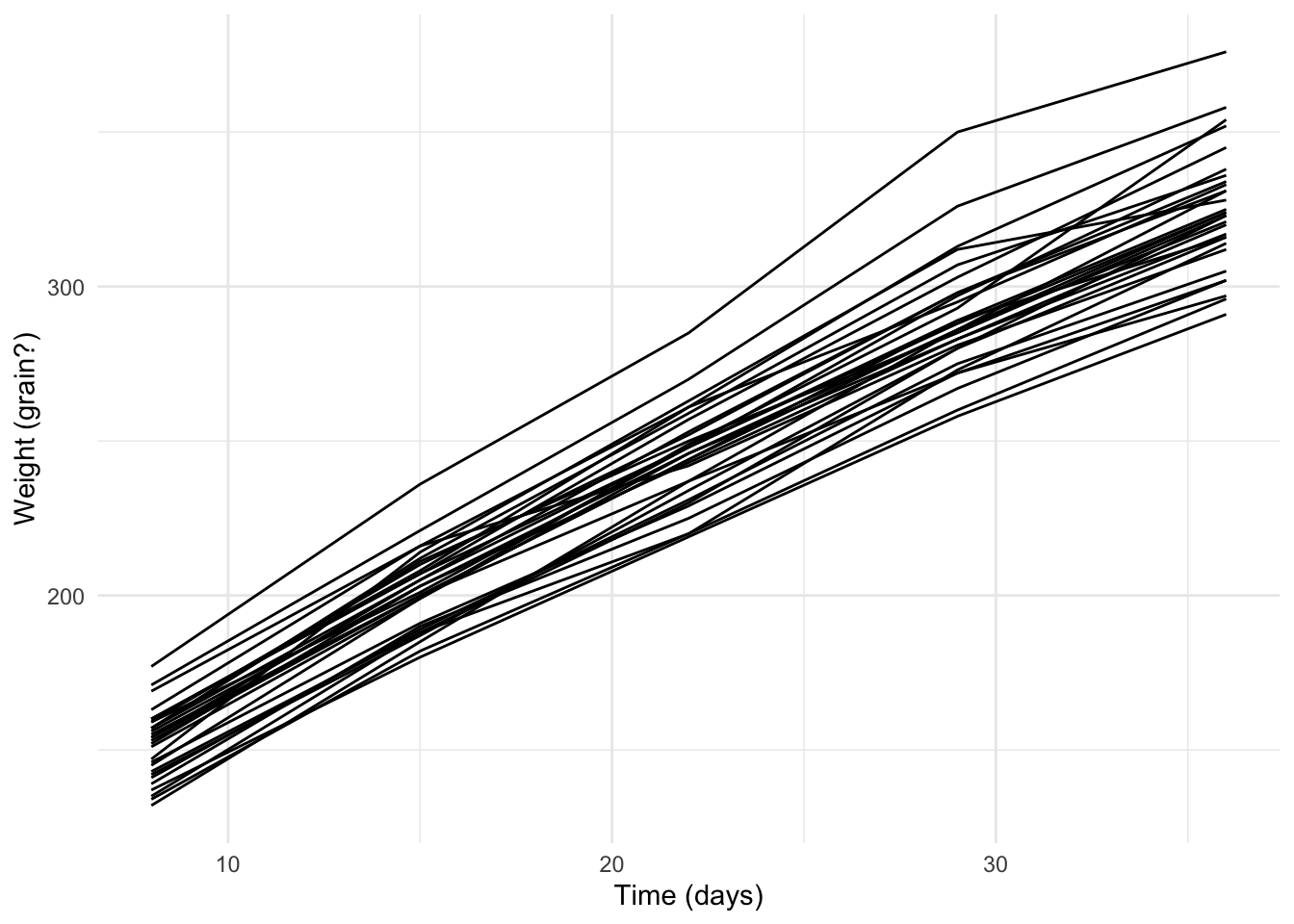
Exercise: Fit a model showing the weight of the rats as a function of their age
rats_lm <- ...Exercise: Look at the model summary() to determine whether or not there’s statistical evidence that the rats’ age affects their weight
Diagnostics
Exercise: Use the residuals() and fitted() functions to extract the residuals and fitted values from the model and add them to the rats_df data frame.
Exercise: Plot the residuals against the fitted values.
ggplot(data = rats_df,
       aes(x = ...,
           y = ...)) +
  ...
Exercise: Do the residuals look IID with, as we move from left to right, the same variance and a mean of 0?
GLMs
Remember that Generalised Linear Models (GLMs) relate the observed outcome variable, \(\boldsymbol{Y}\), to the explanatory variables, \({X}\), through a link function, \(g(\cdot)\) and coefficients, \(\boldsymbol{\beta}\).
\[ g\left(\mathbb{E}(\boldsymbol{y})\right) = X\boldsymbol{\beta} \]
Here, \(g(\cdot)\) is the link between
the expected outcome, \(\mathbb{E}(\boldsymbol{y})\), and
the linear predictor, \(X\boldsymbol{\beta}\), a linear combination of the variables used to predict the outcome
In the following exercises, you’ll need to make sure you specify the family of model you wish to use (e.g. poisson, binomial) otherwise glm() defaults to using a Gaussian/normal model and will give the equivalent to lm()
A Binomial example
Loading and visualising data
We will consider data from Haiti on vaccine coverage for the tri-valent diphtheria-tetanus-pertussis vaccine in 2016. Make a fresh script and load the data (stored in geojson format).
library(sf)
adm2 <- st_read('adm2.geojson',
                stringsAsFactors = F,
                quiet = TRUE)
Exercise: Make a plot showing the relationship between the included dtp3coverage2016 and urbanpct variables. This variable is the proportion of people living in urban areas in the given arrondissement (level 2 admin unit). Include a scatterplot smoother to help visualise the relationship.
The loess smooth (locally weighted polynomial regression) doesn’t replace the need for a model. There may be a relationship but we can’t dismiss or accept it without modelling.
Model fitting
In order to fit the model, we need to tell glm() how many successes and failures we had. In the data frame, the relevant variables are
vacc_num- numerator for vaccine coverage, \(y\)vacc_denom- denominator for vaccine coverage, \(n\)urbanpct- proportion (not percentage) explanatory variable, \(x\)
So our number of failures is
adm2 <- mutate(adm2, vacc_fail = vacc_denom - vacc_num)and the model call is
adm2_binom <- glm(data = adm2,
                  cbind(vacc_num, vacc_fail) ~ urbanpct,
                  family = 'binomial')
Diagnostics
Exercise: Show the model summary
We can also ask for tidier model summaries either as a data frame for the coefficients
library(broom)
tidy(adm2_binom, conf.int = TRUE)
or the model diagnostics
glance(adm2_binom)Prediction
Our observed range of proportion of each region living in an urban area is (0.03, 1) which covers both almost completely urban and almost completely rural areas.
If we want to know what the predicted vaccine coverage was for each region, we can ask for the fitted values from our model
head(fitted.values(adm2_binom)) # this is the first six of 138or use the predict() function on the fitted model
head(predict(adm2_binom, type = 'response'))One of the easiest ways to do this is to use the augment() function from the broom package. It gives us a data frame with the variables used to fit the model and a number of model diagnostics.
rats_aug <- augment(rats_lm)
head(rats_aug)
We need to specify what type of predictions we want, as the default behaviour is to return them on the link (here, logit) scale
head(predict(adm2_binom))## 1 2 3 4 5 6
## 1.0302790 1.0367966 1.0241369 0.9863693 0.6342611 0.7650887and we see that some predicted values are \(> 1\) which means these can’t possibly be predicted proportions.
Exercise: Add the predicted values (on the response scale) to the adm2 data frame and make a plot showing the predicted and observed values.
Exercise: Create a spatial visualisation of the residuals (on the logit scale). Discuss whether they appear to be IID with correlation of 0.
Extension exercise: Calculate the relative risk of vaccine coverage for a completely rural vs a completely urban population, given by finding the ratio of the probabilities in each.
Extension exercise: Fit a Poisson GLM to the vaccine coverage data. The offset variable to be used is the vacc_exp, which is derived from the proportion of vaccinees expected to be found in each arrondissement if the coverage was equal.
Extension exercise: Calculate the change in risk (relative) associated with a change from urbanicity of 1 to 0 by exponentiating the coefficient.